Alchemy

Your sources, your machine, your models.

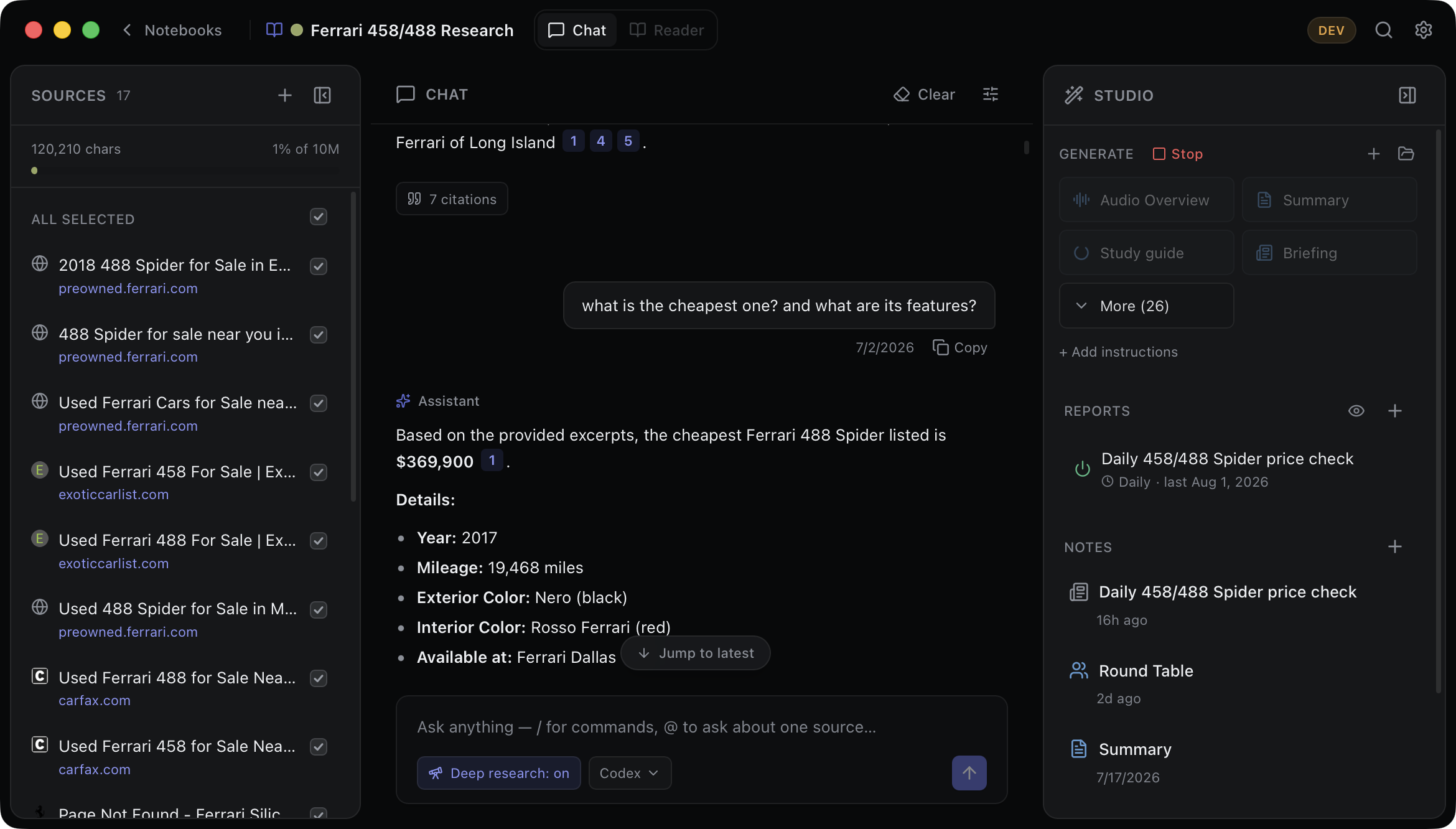
Alchemy is a local-first research notebook for macOS. Import what you're working on — papers, repos, folders, links — chat with it grounded in citations, and turn notebooks into documents, decks, and podcasts. Everything is indexed and stored on a Mac you control.

Requires macOS on Apple Silicon · Signed and notarized · Free and open source (MPL-2.0)

$brew install --cask thrashr888/tap/alchemy
01Models

Chat with any model you already have.

One provider list covers the subscriptions you already pay for — Claude Code, Codex, Gemini CLI, Copilot, and friends, run headless so your existing sign-ins carry the bill — plus 30+ API gateway presets, any OpenAI-compatible endpoint, and local servers like Ollama and LM Studio. On macOS 26 with Apple Intelligence, Apple's on-device model answers entirely offline.

Switch from the model pill in the chat box; every answer is captioned with the model that wrote it. Provider failures land in the transcript in plain language — out of credit, sign-in expired — with a Retry button or the exact terminal command that fixes it.

claude code · codex · gemini cli · cursor · opencode · copilot · hermes · ibm bob · ollama · lm studio · openrouter · groq · apple on-device

02Sources

Git repositories are living sources.

Paste a GitHub or any git URL, or point Alchemy at a local checkout. A ladder in the add dialog — README, docs, everything — lets you pull only the written knowledge when that's all you want. Docs are embedded; code stays searchable-not-embedded, so a monorepo costs almost nothing at rest. When a question looks like code, a ripgrep pass joins retrieval, and per-file symbol outlines make definitions findable by name.

Repos re-sync on a cadence you set, using your own SSH keys, credential helpers, and gh auth — Alchemy never stores a token. A built-in reader gives you the file tree, syntax highlighting matched to your theme, and select-code-to-chat.

Everything else imports too: PDFs, Office files, CSVs, images, URLs, whole folders — and Apple Notes, Reminders, and Calendar as live sources.

Can't remember where a file lives? Search your Mac right from Add Source and add the hit in one click. Cloud drives are first-class — Box, Dropbox, iCloud, Google Drive, and OneDrive are detected as sync roots, with Box Notes and Dropbox Paper read as real documents instead of opaque stubs.

03Retrieval

Answers cite their sources. Citations open them.

Every question runs hybrid retrieval: vector similarity finds paraphrases, BM25 full-text finds the exact names, codes, and numbers embeddings miss, and the two lists fuse deterministically — the same question cites the same passages. Answers cite the passages they drew from; click a citation and the source opens in the reader, scrolled to the highlighted text.

For harder questions, a deep-research mode plans its own retrieval — searching, reading, and distilling evidence until it has enough to answer. And Ask Everything (⌥Space) answers across all your notebooks at once.

Retrieval holds up as a library grows — search quality is verified flat from 1M to 10M characters, so a large source list stays fully searchable instead of diluting every answer. In the background, each source gets a distilled gist that powers corpus-wide "what's in here?" questions, and broad asks — "summarize the themes," "what do these disagree on?" — are assembled across every relevant source, not just the closest passages.

04Studio

Notebooks become artifacts.

One click generates a document against the latest sources — and artifacts are real, not text dumps. Flashcards are a flippable deck with spaced repetition, quizzes grade themselves, slide decks render as true 16:9 slides with a Present mode, and mind maps land on a pannable canvas. All export to PDF through the native print system.

Audio Overview turns a notebook into a two-host podcast episode — scripted by your chat model, voiced entirely on-device by Kokoro neural TTS. The script stays editable as a note; the episode plays inline.

  • Summary
  • FAQ
  • Study guide
  • Briefing
  • Timeline
  • Insights
  • Data table
  • Problems
  • Flashcards
  • Quiz
  • Slide deck
  • Mind map
  • PRD
  • PR/FAQ
  • RFC
  • Skill
  • Podcast
05Agents

Agents get the same notebook you do.

An embedded MCP server — localhost-only — lets agents create notebooks, add sources, run the same hybrid search, write notes, and grep or structurally search your repositories. Watch a notebook fill in live while an agent researches. One-click connect ships for a dozen agent tools in Settings.

claude code · codex · copilot · vs code · opencode · gemini cli · antigravity · factory droid · aws kiro · ibm bob · hermes

06Privacy

Local-first is the architecture.

Sources are extracted, chunked, and embedded on your machine and stored in an embedded database in your app-data folder — no server, no account. Embeddings run on a built-in on-device model even when chat goes through a gateway, so nothing but your chat turns leaves the machine.

API keys live in a local config file and are sent only to the gateway you configured. Podcast audio is synthesized on-device. With Ollama or Apple's on-device model, the whole loop runs offline.

07And

Also in the box.

Command menu. ⌘K searches notebooks, adds sources, generates documents, and switches themes.

Slash commands. Type / in the composer for every generator and action — including /grep, an exact-match search with no model call.

Your text size. The whole interface scales to the macOS Accessibility text-size setting, live.

Part of the Mac. Menu bar extra, "Add to Alchemy" in the Services menu, Spotlight-indexed notebooks, and alchemy:// deep links.

Web clipper. The Chrome extension clips a page, link, or selection to a notebook — including pages behind a login, read from your own tab. Loads in Firefox and Safari too.

Reader. Browser-style back/forward, find-in-source, and select-to-ask: Explain or Compare any passage.

Folder sources. Point at a folder — iCloud, Dropbox, OneDrive included — and it keeps syncing.

OCR. Images and scanned PDFs are transcribed by a local vision model.

Scheduled reports. A notebook refreshes its URL sources on an interval and reports what changed.

Share notebooks. Export sources and notes as a plain-markdown OKF bundle; import merges and re-embeds locally.

20 themes. Midnight to Solarized to Synthwave '84, dark and light, carried through every surface.

Get Alchemy

Free and open source under MPL-2.0. Requires a Mac with Apple Silicon; builds are signed and notarized. Bring a subscription, an API key, or run fully local.

$brew install --cask thrashr888/tap/alchemy